


New Scientist
4.6393.00 Reviews
App Specs
- Version
- 4.21
- Updated On
- License
- Free
- Downloads
- 500,000+
- Developer
- New Scientist
- Categories
- News & Magazines
- Platform
- Android, iOS
Screenshots
 Analysis by AppCompare
I usually reach for a science magazine app when I want more context than a headline can give me, but don’t have time to chase down a dozen sources. New Scientist is aimed at that in-between moment: a curious reader can dip into reporting on research and ideas without needing a specialist background. In my experience, its appeal is less about turning every spare minute into study time and more about making it easy to follow a subject beyond the first surprising fact.
Where the first hurdles tend to appear
The main practical question is access. The app is free to install, but that does not mean every part of its magazine content is necessarily free to read. New Scientist is a publication, and the app includes in-app purchases, so I would check what is available to me before settling into a reading routine. That distinction matters if you expect a free news feed to provide unlimited access to every article.
It is also worth deciding what kind of science reading you want. This is not the best fit if you only want quick, unfiltered headlines or a feed covering every subject in the news. I find it more useful when I’m interested in the explanation behind a development—what a finding means, what remains uncertain, and how it connects to a wider scientific question. Readers who prefer short updates with no longer reads may find the magazine approach too involved.
New Scientist is published by New Scientist, and the app sits in the News & Magazines category. Its average rating is 4.6 from around 6,700 ratings, with roughly 390 written reviews and over 500,000 installs. Those figures suggest it has found a substantial audience, though they can’t tell you whether its editorial style matches your interests. I’d treat the sample article and the access options as better tests than popularity alone.
Before you settle into a reading routine
The app is free, is rated Everyone 10+, and its current version is 4.20. It requires Android 8.0 or later, so I’d check the operating-system requirement before troubleshooting an installation problem. The app has been around since April 8, 2010, and offers in-app purchases ranging from $1.99 to $180.00 per item. That is a broad range, so I would read the purchase details shown in the app carefully rather than assume every option is the same kind of access.
If setup feels confusing, I’d take it one step at a time: confirm that the app installed successfully, open it while connected to a reliable network, and check what the app itself shows about available reading or purchase choices. If a page will not load, I would first try another connection and reopen the app before changing anything more involved. That simple check can separate a temporary connection problem from an account or access question.
Recovering a reading session
A practical habit is to treat reading as a small workflow. When an article catches my attention, I finish the piece or make a note of its subject before switching away, then return to it through the app rather than trying to remember a headline later. If something seems to disappear, I’d search using a distinctive phrase or topic and check the app’s available sections again. This is a general way to recover a session, not a promise that every item will be stored in a particular list.
Worth Reading Before You Choose

EA SPORTS FC Mobile 26 Is a Bigger Football Game, but It Takes Time

Flipboard Shows What News Apps Must Do Beyond the Feed

Switching to Android Auto Means Rethinking Your Driving Routine

Google Calendar Makes a Crowded Week Easier to Manage

Ludo King Makes the Most of the Minutes Between Plans

Baby Panda World Brings Quick Play to Modern Phones, but Its Game Library Feels Busy
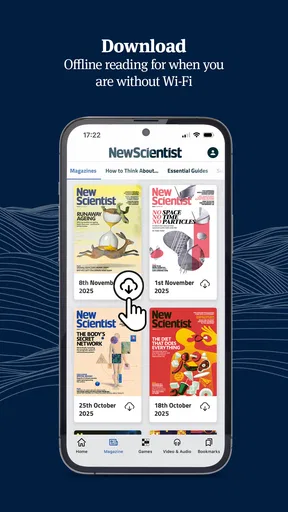
Offline reading can be useful when a connection is unreliable, but I would prepare before leaving home: save the material I expect to read while online, then check that it opens before I lose access to the network. If a saved item does not appear to be available, reconnect and allow the app to load before assuming the content or account is broken. This makes offline access a deliberate part of the routine rather than a last-minute rescue.
Notifications are another setting I’d handle according to my own attention span. Breaking science news can be worthwhile, but frequent alerts may interrupt work or make every story feel equally urgent. I’d enable them only if I genuinely want timely prompts; otherwise, opening the app when I have a few minutes gives me more control. For a calmer habit, I would choose a regular check-in instead of letting alerts dictate when I read.
When the app may not be the problem
If an article or feature is unavailable, it helps to distinguish a technical issue from an access limit. A network interruption can stop content loading, while an in-app purchase or publication access choice can affect what is readable. I would check the connection, restart the app, and review the access information shown on screen before repeating a purchase or reinstalling. That order avoids turning a temporary loading problem into unnecessary account or payment confusion.
For a phone that cannot install the app, the minimum Android requirement is a useful first check; an older system may be the obstacle rather than the app itself. If the app opens but behaves inconsistently, I’d update it where an update is available, close and reopen it, and try again on a steady connection. These are ordinary first checks, not guarantees, but they’re sensible before assuming that a device or account needs a more drastic fix.
What’s Inside the New Scientist App?
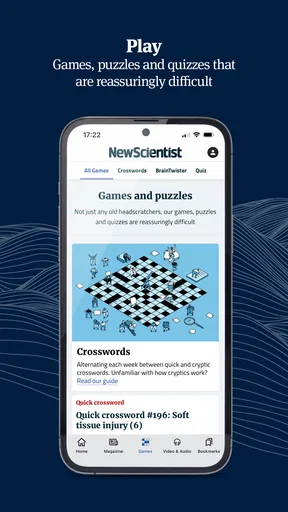
If you've ever flipped through a New Scientist magazine, you'll know the kind of high-quality content I'm talking about. The app brings that same magic right to your phone or tablet. And it’s not just articles; we’re talking podcasts, videos, and even interactive features that make you feel like a part of the science community.
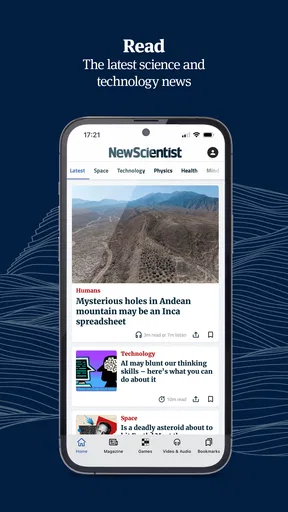
The user interface is slick and intuitive, making it super easy to navigate through different sections. Whether you're into physics, tech, space, environment, or health, the app’s got you covered. As soon as you open it, you’re greeted with the latest headlines. Just a tap, and you’re diving deep into a world of science. It’s as if the app knows exactly what you’re in the mood for.
Content That Keeps You Hooked
Now, let’s talk content. The articles are fascinating—no two ways about it. They break down complex topics into bite-sized pieces, so even if you’re not a science whiz, you’ll get it. And for those who love to geek out, the app offers in-depth analyses and expert opinions. It’s like having a conversation with the brightest minds in the field.
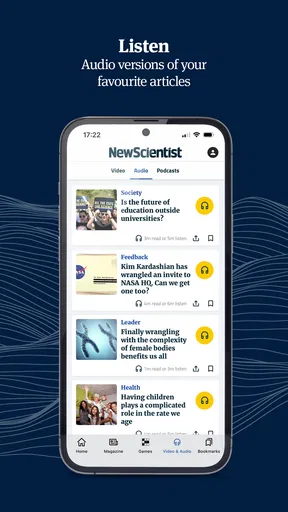
The New Scientist app also features a plethora of podcasts and videos. Perfect for those moments when you’re too busy to read but still want to soak up some knowledge. Pop in your headphones during your morning commute, and suddenly, traffic becomes a little more bearable.
Personalized Experience
What I particularly love about this app is the personalized experience it offers. You can tailor your feed according to your interests. This means you’re not bombarded with content you couldn’t care less about. Instead, you get a curated list of articles and features that match your tastes.
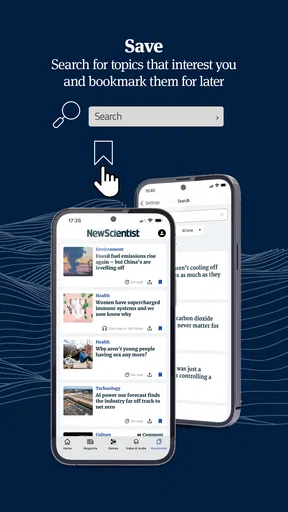
And if you’re someone who likes to dig deeper, the app has a robust search feature. Just type in a keyword, and boom—you have a treasure trove of articles at your fingertips. It’s like having a digital library dedicated solely to science.
A useful way to make that search work harder is to start broad, then narrow the wording. If I’m following a topic such as space or health, I might first search for the general subject, then try a distinctive term from the article I remember. That is more reliable than guessing an old headline word for word, especially when I’m returning to a story after a few days. I also treat search as a discovery tool, not just a filing cabinet: an older explainer can give helpful background before I read a new report.
Personalization has a trade-off, too. A feed shaped around familiar interests is convenient, but it can quietly reduce the chance of stumbling across subjects I would not have chosen myself. I’d occasionally browse beyond my usual topics so the app remains a window onto science rather than a mirror of my existing preferences. That balance is especially useful for readers who want both a comfortable daily read and a broader sense of what researchers are discussing.
Easy Access and Offline Reading
One standout feature is the ability to download content for offline reading. This is a game-changer, especially if you’re on a plane or somewhere with spotty Wi-Fi. You can save your favorite articles and read them at your leisure. It’s like carrying a piece of the universe in your pocket.
Oh, and did I mention the notifications? The app keeps you up to date with breaking news alerts. So, you’ll always be the first to know about that groundbreaking discovery or the latest in scientific research.
For a realistic weekday use, I’d check the headlines over breakfast, open one story that connects to something I have been wondering about, and save a longer read for a commute or a quiet break. If I’m travelling, I’d prepare the reading while I still have a good connection and use audio or video when looking at a screen is inconvenient. This works better than trying to consume every alert as it arrives: science stories often reward a little uninterrupted attention, and the app is most useful when I choose the moment rather than let the moment choose me.
That makes the app a stronger match for people who enjoy explanatory journalism and want several ways to engage with science. Students can use it to encounter accessible context around topics they are studying, while curious readers may appreciate having reporting and analysis in one place. I would not treat any magazine app as a substitute for specialist papers, textbooks, or professional advice, though. If I need technical detail or evidence for a formal project, I would use the app as a starting point and then consult primary research or dedicated references.
Compared with general news apps, New Scientist keeps its attention on science, which means less time filtering unrelated headlines and more room for context within its chosen subject. Compared with a broad web search, it offers a more editorially shaped reading experience, but it is less suited to someone who wants to compare every source or follow live developments across all fields. And unlike a short-form social feed, it asks for a little more patience. I see that as a useful trade when I want a considered read, but a disadvantage when I only have seconds or need immediate coverage of a fast-moving event.
Who will get the most from it
I’d recommend trying it if science is a regular interest rather than an occasional curiosity, particularly if you like moving between quick news and longer explanations. It may also suit someone who wants to replace aimless scrolling with a more focused reading habit. The app’s free entry point makes it easy to explore, but I would decide whether the available access and any purchase options make sense for my own reading frequency before committing to a paid choice.
On the other hand, I’d skip it if I mainly want a completely free, broad news feed, a specialist academic database, or a source that reports every topic with equal depth. It is also not ideal if notifications and reading queues tend to become clutter rather than help. In that case, a simple browser search or a general news app may be more practical. The key question is whether I want science presented as a magazine experience, with selected stories and room to explore, rather than an all-purpose stream.
Final Thoughts
In a world where information is abundant but time is scarce, the New Scientist app is a gem. It’s informative, engaging, and incredibly user-friendly. Whether you’re a casual reader or a science enthusiast, this app makes learning feel less like a chore and more like an adventure.
If you’re ready to dive into the world of science with style, give this app a whirl. You might just find yourself hooked, eagerly awaiting the next headline.
My practical verdict is that New Scientist works best when I use it intentionally: choose a subject, read beyond the headline, and keep offline access and alerts aligned with my routine. Its magazine focus is a genuine strength for curious readers who want science explained, but it is not the right tool for every kind of research or every budget. I’d start by exploring the reading experience, checking the access terms that appear in the app, and deciding whether its depth earns a place in my regular news rotation.
Pros
- User-friendly interface for easy navigation.
- Regular updates with the latest science news.
- Offline reading mode for convenience.
- Customizable notifications for preferred topics.
- High-quality articles with expert insights.
Cons
- Limited free content
- subscription required.
- Some articles are region-specific.
- Occasional app crashes reported by users.
- No dark mode option available.
- Ads can be intrusive without subscription.
FAQs for New Scientist
What is New Scientist and what are its main features?
New Scientist is a renowned app that delivers the latest science and technology news directly to your device. Key features include access to in-depth articles, interactive elements, and multimedia content. Users can customize notifications for specific topics and save articles for offline reading, making it a comprehensive resource for science enthusiasts.
Is a subscription required to access all content on New Scientist?
Yes, while the New Scientist app offers some free content, a subscription is required to access its full library of articles and features. Subscriptions typically include unlimited access to both the app and the website, providing a seamless experience for users who want to stay informed on the latest scientific developments.
Can I access New Scientist offline?
Yes, the New Scientist app allows users to save articles for offline reading. This feature is particularly useful for those who want to catch up on scientific news while traveling or in areas with limited internet access. Simply bookmark articles while connected, and they’ll be available offline.
What platforms is the New Scientist app available on?
The New Scientist app is available for both Android and iOS devices. It is optimized for smartphones and tablets, ensuring a smooth and user-friendly experience across different devices. The app is regularly updated to support the latest operating systems and device capabilities.
How does New Scientist ensure the accuracy of its content?
New Scientist prides itself on delivering accurate and up-to-date scientific information. The app relies on a team of expert journalists and scientists who rigorously fact-check articles before publication. Additionally, it often collaborates with leading researchers to ensure its content is credible and reliable.


